Copying data from DOS mode program screens


If you're still using DOS or console mode (also refereed to as character mode) programs that doesn't provide a way to export data, you maybe looking for a way to capture what's displayed on such programs. 


Backing Up Your Windows Registry


Removing a virus or worm usually requires editing the Windows Registry, and the first step we recommend is to back it up. In the past, we've pointed readers to the Microsoft Knowledge base article KB322756 for details on backing up the registry. However, when it comes to backing up the whole registry, the KB information gets a little complicated when it doesn't need to.


Automatic Screen Refresh Tips


When you are working on your local computer and want to refresh any changes in your system automatically. For example some times you are watching sports results, online Stock Exchange rates and any changes to your hard drive but these changes are not usually refreshed until you press the F5 key on your keyboard.


Turn Off Auto CD Drive Play


1.Open My Computer
2.Right click on your CD ROM and choose Properties
3.Click on the Auto Play tab
4.In the drop down box you can choose the Action for each choice shown in the drop down box 
Or


15 Best Windows 7 Tips and Hacks


You have upgraded to Windows 7, love the new taskbar, and enjoy the power of using the cool Libraries feature. But now you want more. You want the cool tips and tricks that make Windows 7 fun!
So here are the best ones to help you get the most out of your new OS. In this article, we will focus on the Windows 7 interface to get you started on the road to becoming a Windows 7 Power User. In Part 2, we will be looking at advanced tips for usability, performance, and security.


Password Protect Folders in XP


image
Do you share a computer with other users and want some extra security on your folders? There are two ways to password protect a folder built into Windows XP (for other Windows flavors, there are some freeware/shareware programs out there):

1. If you have a log in password for your account, this can be used to protect folders from other users. Your hard drive must be formatted using NTFS (which it probably is unless you're dual booting with another operating system). Here's what to do.


How to hide entire Partition or drive :


This Step To Hide Entire Partition:
  1. Click on Start>Run
  2. Type gpedit.msc
  3. Navigate through user configuration> administrative templates > windows components> windows explorer
  4. Double click on “Hide these specified drives in My Computer”
  5. Click on Enable
  6. Choose a drive which you want to hide, Click Apply.


How to remove "New Folder.exe Virus" manually or using software?


New Folder.exe Virus
New Folder.exe virus mostly spread through the USB drive. It cannot be deleted normally. Here are the steps to remove this virus easily
  1. Find out all the locations of the “newfolder.exe” virus.
  2. Open the task manager and end the newfolder.exe process running in background.
  3. Open cmd and then type “dir /a XXX” where XXX is the name of the folder where the virus is.
  4. Then type “cd XXX”.


Tweak Windows Vista and Windows7 using Ultimate Windows Tweaker


Tweak Windows Vista and Windows7 using Ultimate Windows Tweaker
Ultimate Windows Tweaker is a free tweak utility available for tweaking and optimizing Windows 7 and Windows Vista (32 bit & 64 bit). This utility makes your system faster and more stable. Same utility for windows7 as well as windows Vista. It auto-detects the operating system and functions accordingly


How to disable Turn Off Option and ALT+F4 option :


 Follow This Instruction:
  1. Click Start>Run
  2. Type regedit
  3. Navigate through HKEY_CURRENT_USER>Software>Microsoft>Windows>Policies>Explorer
  4. Then on the right side, Right click on blank area, Create a new DWORD value with name NoClose.
  5. After creating click on it and give Value Data 1.
  6. Now Reboot your Computer.


Double cilck does not open Drive - Godzilla Virus


Hacked By Godzilla

Hacked By Godzilla - Virus Fixed
Hacked By Godzilla is a new computer virus that widely infect from using Handy Drive or Floppy Disk
1. We can not Double Click to open any Drive on our computer. But we can Right Click to Open or     Explore.
2. There is a text “Hacked By Godzilla” on Title Bar of Internet Explorer.

How to fix Godzilla


Command Prompt on Right-Click


You can download an execute a file to add to registry,
or you can manually add it to the registry.
To download the file Click Here.
To add manually, fallow the steps given below :

  1. Start > Run
  2. Enter "regedit" and hit Enter
  3. Expand to "HKEY_LOCAL_MACHINE\SOFTWARE\Classes\Folder\shell"
  4. Right-click on "shell" and select New > Key


How to rename your recycle bin


Free Recycle Bin Full iconThis trick will show you how to rename your recycle bin, though there are many softwares to do this, this is safe and tested. Carry out the following steps to do this :
  1. Click on button > click on Run option.
  2. Type here regedit.exe and press enter then you will find there regedit editor.
  3. In regedit editor , HKEY_CLASSES_ROOT folder.


Hack to Disable Writing to USB Drives


http://img225.imageshack.us/img225/2323/flashmemoryow7.pngTo Disable Writing USB Drive, Follow This Step:

1.Open Registry editor
2.Brouse to the following Key [HKEY_LOCAL_MACHINE\SYSTEM\CurrentControlSet\Control\StorageDevicePolicies]


Disable Control Panel


You can prohibit users from using the Control Panel.
  • Click ‘Start | Run’.
  • Type ‘GPEDIT.MSC’
  • When the group policy window opens, scroll to ‘User Configuration |Administrative Templates | Control Panel’.
  • On the right panel, double-click on ‘Prohibit access to the ‘Control Panel’
  • Select ‘Disabled’ in the ‘Properties’ window that comes up next.


Intel Ghost Processor 10.00Ghz


Here is a trick to change the name of the processor. You can change it to anything you like. 
       
Here are the steps:
  • Go To Start>Run
  • Type Regedit
  • Browse to Hkey_Local_Machine>Hardware>Discription>System>Central Processor
  • On Right Panel, Double-Click On Processor name string.


Fix the problem of Show hidden files and folders getting reset


Fix the problem of Show hidden files and folders getting reset
This is a common problem these days that the option of “Show hidden files and folders” always gets reset each time when we set it to show the hidden files. This is sure a case of infected system either with Trojan or virus.
Possibly the system is infected by a virus named “amvo.exe”. So let’s remove this first to be on a safer side.

Steps to remove amvo.exe:
1. We need to delete following files
  • amvo.exe
  • amvo0.dll
  • amvo1.dll

2. Open command prompt by typing cmd in the Run box. Then type
  • cd windows\system32
  • attrib -s -h -r amvo*.*
  • del amvo*.*

Steps to fix the problem:
  1. Now open registry editor and navigate to the entry HKEY_LOCAL_MACHINE\SOFTWARE\Microsoft\Windows\CurrentVersion\Explorer\Advanced\Folders\Hidden\SHOWALL
  2. On the right side see the entry named “CheckedValue”, if the value is set to ‘0′ change it to ‘1′.
  3. The “DefaultValue” under the “CheckedValue” should be set to ‘2′.
  4. Click Refresh under the view tab and if the entries the same that we set just now that means the problem is solved.


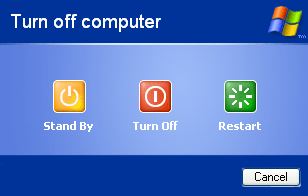
Add a Hibernate button to shutdown screen


For all those who hibernate their pc, this trick comes handy. Traditionally, to hibernate our PC, hold down the shift key on the shut down screen, the Stand by button changes to Hibernate then we click on it. This trick adds a Hibernate button to the Shut down screen. Now you have all four buttons on one shot, no need to press Shift key.

The below pictures will explain more clearly.

Before:-


After:-

After performing the trick

Steps:-
We have to make some changes to the registry.
As a word of caution, take a back-up of your registry.
Now, To add the button, download show_hibernate.zip and execute the registry file inside it.
To add the button, download hide_hibernate.zip and execute the registry file inside it.

Click to download the documents:


How to disable smart window arrangement in Windows 7


Windows 7 features interesting new ways to intelligently arrange your windows, so that (for example) if you drag a window to the top of the screen then it will maximise. We like the new system, but if you find it distracting then it's easily disabled.


Taskbar Thumbnail Preview mechanism for Windows XP


Preview mechanism for Windows XP
Windows 7 has thumbnail preview feature. Taskbar Thumbnail Preview displays small thumbnail preview of opened window on your taskbar when you hover your mouse on taskbar icons. Many users have started loving taskbar thumbnail preview of windows 7.


Your Ad Here
 

aia En ciel's Copyright © 2010 | All Rights Reserved | Using Blogger | LKart Theme | Edit by. aia En ciel's